
A single picture can inspire an entire 3D creation. With modern image-to-3D AI tools, artists, designers, game developers, and digital creators can transform photographs, illustrations, product images, and concept art into three-dimensional models. Instead of building every object from scratch, users can upload an image and let AI help create a model they can refine for their projects.
Image-to-3D technology opens up exciting possibilities for product visualization, game assets, virtual environments, character design, animation, and digital art. It can also help beginners explore 3D modeling without spending months learning complex modeling techniques before producing their first result.
However, every platform offers a different approach. Some focus on reconstructing objects from images, while others provide advanced tools for editing, sculpting, or preparing models for professional use.
In this guide, we explore seven tools worth considering for image to 3D model creation in 2026. Bake3D.ai takes our top spot for its AI-powered 3D creation workflow and its additional capabilities for texturing, rigging, and animation. The other six options offer different features that may suit particular creative needs.
1. Bake3D.ai — Our Top Pick for Image-to-3D Creation
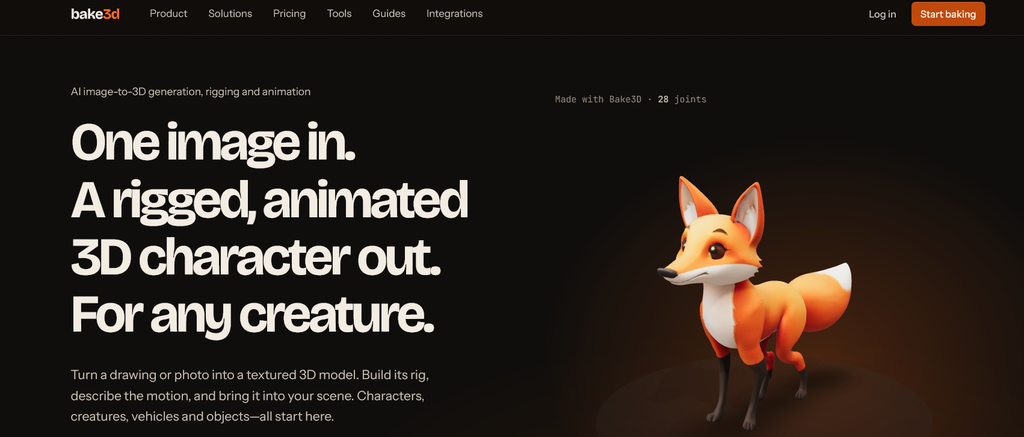
Bake3D.ai is our first choice for creators who want to turn visual ideas into three-dimensional assets through an AI-assisted workflow. The platform brings together image-to-3D generation and other 3D creation capabilities, giving users an opportunity to explore more than the initial modeling stage.
Traditional modeling often requires artists to study reference images, build geometry, adjust proportions, and develop surface details manually. Image-to-3D AI can simplify the initial process by using an uploaded image as a visual reference for generating a three-dimensional interpretation.
This approach works especially well during concept development. A designer can start with an image of a product, creature, decorative object, or character and explore how that idea might translate into a 3D form.
What makes Bake3D.ai stand out?
The platform’s appeal comes from its broader creative workflow. In addition to image-based 3D generation, Bake3D.ai offers text-to-3D capabilities and features related to texturing, automatic rigging, and text-directed animation.
These capabilities can be useful when a project involves several connected stages. For example, a creator might begin with an illustration of a fantasy creature, generate a corresponding 3D model, develop its appearance, and then explore ways to prepare it for animation.
Rather than treating model generation as the entire project, this approach encourages creators to think about how their assets will be used.
Main advantages
- Image-to-3D generation: Use visual references as a starting point for creating three-dimensional concepts.
- Text-to-3D support: Explore another route when you have a written description rather than a finished image.
- Texturing capabilities: Develop the visual appearance of generated assets.
- Character workflow support: Explore rigging and animation options for suitable characters and creatures.
- Accessible experimentation: Test creative ideas without constructing every component manually.
- Multiple creative applications: Develop concepts for games, animations, digital art, and virtual environments.
Who should try Bake3D.ai?
Bake3D.ai is a strong starting point for beginners, independent creators, and experienced designers who want to experiment with AI-assisted 3D production. It is particularly appealing when you want to explore the journey from a reference image to a model that may eventually become part of a larger creative project.
Our verdict: Bake3D.ai earns first place for its combination of image-to-3D creation and related modeling, texturing, and animation capabilities.
2. Polycam — A Versatile Option for Reconstructing Real Objects
Polycam provides tools for capturing and reconstructing real-world spaces and objects as digital 3D content. It is particularly relevant to creators who want to turn physical subjects into digital models using photographs or supported capture methods.
While traditional image-to-3D generation can create a new interpretation from a single reference image, real-world reconstruction often benefits from multiple photographs or a supported scanning workflow. Polycam offers an option for users who want to capture actual objects rather than generate entirely imaginary designs.
Where Polycam fits into the workflow
Imagine that you want to create a digital representation of a chair, sculpture, decorative object, or architectural detail. You can capture the subject using a supported method and use the resulting 3D data in a digital design workflow.
This approach can be helpful for visualization, documentation, virtual presentations, and other projects that benefit from real-world references.
Notable benefits
- Supports real-world 3D capture and reconstruction workflows.
- Offers a useful route for digitizing physical objects and spaces.
- Can support creative, design, and visualization projects.
- Provides a different approach from generating a new object solely from a written prompt.
Our verdict: Polycam is worth exploring when you want to reconstruct real objects or spaces rather than rely exclusively on generative AI.
3. RealityCapture — Detailed Photogrammetry for High-Quality Assets
RealityCapture, now part of the RealityScan product family, is associated with photogrammetry workflows that reconstruct three-dimensional scenes and objects from photographs. It is a useful option for creators who can capture multiple views of a subject and want to produce detailed digital representations.
Photogrammetry differs from single-image AI generation. Instead of asking a model to infer the complete object from one picture, it uses overlapping photographs to calculate three-dimensional information about the photographed subject.
Why creators choose photogrammetry
When you can photograph an object from several angles, you provide the reconstruction process with more information about its shape and surface. This can be useful for scanning sculptures, environmental details, props, and other physical subjects.
The quality of the result depends on several factors, including image coverage, lighting, surface characteristics, and the consistency of the photographs.
Key strengths
- Reconstructs objects and environments from photographic input.
- Supports detailed digital asset creation.
- Can suit visualization and production workflows.
- Offers a photography-driven alternative to prompt-based model generation.
RealityCapture is not a simple one-image AI generator, so it is best suited to projects where you can collect the necessary photographic references.
Our verdict: Consider RealityCapture when you need detailed reconstruction from multiple photographs and want greater control over the capture process.
4. Regard3D — An Open-Source Route to Image-Based 3D Reconstruction
Regard3D is an open-source photogrammetry application designed to reconstruct three-dimensional information from a collection of photographs. It offers a different path for creators who enjoy experimenting with technical tools and want to understand how image-based reconstruction works.
Rather than relying on a single AI-generated interpretation, the application uses a structure-from-motion approach to estimate camera positions and reconstruct scene geometry from multiple images.
How Regard3D can help
Suppose you photograph a small object from multiple angles and want to explore its shape as a digital model. A photogrammetry workflow can use the overlapping images to estimate the object’s three-dimensional structure.
This process takes more preparation than uploading one picture to a generative model, but it can provide a valuable learning experience for users interested in 3D reconstruction.
Reasons to explore it
- Open-source software for image-based reconstruction.
- Useful for learning about photogrammetry techniques.
- Can process collections of photographs to reconstruct 3D information.
- Offers an alternative for technically curious creators.
Because Regard3D is a specialist reconstruction tool, users should check current compatibility and project requirements before choosing it for a new production pipeline.
Our verdict: Regard3D is worth investigating if you prefer open-source software and want to explore the technical side of creating 3D models from photographs.
5. Meshroom — An Accessible Photogrammetry Workflow for Creators
Meshroom is an open-source 3D reconstruction application built around photogrammetry. It helps users transform collections of photographs into three-dimensional reconstructions through a node-based processing pipeline.
The application can be particularly useful for creators who want to digitize physical objects, props, sculptures, and environmental details. It also provides an opportunity to explore how different reconstruction stages contribute to the final result.
What makes Meshroom useful?
A successful reconstruction usually begins with a good photographic collection. Images should overlap sufficiently, show the subject from useful angles, and capture enough detail for the software to identify matching visual features.
Meshroom processes the photographs through a series of reconstruction steps. The resulting model can then become a starting point for further cleanup, texturing, or integration into another 3D application.
Main advantages
- Open-source software for photogrammetry.
- A node-based approach to reconstruction.
- Suitable for experimenting with physical-object digitization.
- Helpful for creators interested in understanding a 3D reconstruction pipeline.
Meshroom is different from a generative image-to-3D service because it relies on multiple photographs and a reconstruction process rather than simply interpreting a single illustration.
Our verdict: Meshroom is a useful option for users who want an open-source workflow for reconstructing real-world objects from photographs.
6. AliceVision — A Powerful Foundation for Photogrammetry Projects
AliceVision is an open-source computer-vision framework that supports photogrammetry and 3D reconstruction workflows. It also serves as the technology foundation for Meshroom, making it relevant to users who want to understand or build upon the underlying reconstruction process.
Unlike a simple online generator, AliceVision is more technical. It is aimed at people interested in the methods and components used to reconstruct three-dimensional information from images.
Why it deserves attention
Photogrammetry involves several connected tasks, including identifying visual features, estimating camera positions, building a point cloud, and reconstructing geometry. Frameworks such as AliceVision provide tools that support these types of operations.
For developers, technical artists, and research-oriented users, this can offer more insight into the reconstruction process than a fully automated service.
Potential advantages
- Open-source computer-vision technology.
- Components for image-based 3D reconstruction.
- A foundation for customized photogrammetry workflows.
- Relevant to developers and technically experienced creators.
AliceVision requires more technical understanding than beginner-focused generators, so it may not be the fastest route for someone who simply wants to upload one image and receive a model.
Our verdict: Explore AliceVision if you want to understand, customize, or develop workflows based on photogrammetry and computer vision.
7. OpenMVG — Explore the Mathematics Behind Image-to-3D Reconstruction
OpenMVG, short for Open Multiple View Geometry, is an open-source library focused on computer-vision methods used to reconstruct three-dimensional information from multiple images. It provides tools related to camera geometry, feature matching, and structure-from-motion.
This makes it a specialized choice for developers, researchers, and advanced users who want to build or investigate image-based reconstruction systems.
How OpenMVG supports 3D projects
When a collection of photographs captures the same object from different viewpoints, computer-vision techniques can identify common features and estimate how the cameras relate to one another. These estimates help establish the geometric foundation for reconstructing a scene.
OpenMVG provides components for working with these problems. Developers can incorporate them into custom pipelines or use them as part of a broader reconstruction workflow.
Standout features
- Open-source tools for multiple-view geometry.
- Support for structure-from-motion workflows.
- Useful components for developers working with image-based reconstruction.
- An option for users who want greater technical control over the process.
OpenMVG is not a one-click consumer AI generator. It is better suited to technical projects that involve image processing and reconstruction.
Our verdict: OpenMVG is a worthwhile option for developers and advanced users who want to explore the underlying technology behind image-based 3D reconstruction.
How to Choose the Best Image-to-3D Tool for Your Project
The right platform depends on your source image, the type of model you need, and how you plan to use the result. Before making a decision, consider these important factors.
Start with your image type
A single product photo, a hand-drawn illustration, a character concept, and a collection of photographs present different challenges. Generative AI tools can help interpret a single image, while photogrammetry tools generally benefit from multiple overlapping photographs.
Check the final model’s quality
Review the geometry, proportions, surface details, and overall resemblance to the reference. Some projects only need a convincing visual concept, while others require clean topology and more precise geometry.
Consider textures and materials
A visually appealing model needs suitable surface details. Find out whether your chosen tool generates textures, reconstructs them from photographs, or requires additional software for material creation.
Look at export formats
Check compatibility with your preferred software. Formats such as OBJ, GLB, GLTF, and FBX support different workflows, and you should verify which formats your chosen platform actually exports.
Think about animation and editing
If you intend to animate a character, you may need rigging, clean geometry, and additional preparation. For a static product visualization, those features may be less important than shape accuracy and surface quality.
Review cost and usage rights
Before using generated or reconstructed models commercially, review the tool’s pricing, export limitations, and licensing conditions. Confirm that the selected plan permits your intended use.
Final Verdict: Turn Your Reference Images Into 3D Possibilities
Image-to-3D technology gives creators new ways to transform visual references into digital assets. Whether you are developing a game character, digitizing a physical object, building a virtual environment, or experimenting with product design, the right tool can make the creative process more flexible.
Polycam is useful for capturing real-world objects, RealityCapture supports detailed photogrammetry, Regard3D provides an open-source reconstruction workflow, Meshroom offers a node-based approach, AliceVision provides technical reconstruction components, and OpenMVG supports developers exploring multiple-view geometry.
Bake3D.ai remains our top choice for creators looking for an AI-powered approach to image-to-3D creation with additional tools for developing and animating assets. Its combination of image-based generation, text-to-3D capabilities, texturing, rigging, and animation options makes it a compelling place to begin exploring a broader 3D workflow.
You do not need to master every aspect of traditional modeling before you start experimenting. Begin with a clear reference image, choose a workflow that matches your goal, and refine the result as your project develops.